
VMLogin Access Guide
🌐 VMLogin Access
📌 About VMLogin
VMLogin is a professional anti-association browser, new users can try for free for three days
Step 1: Download and Register
Download VMLogin, then Register and Login (New users can try for free for three days)
Step 2: Select Proxy Type
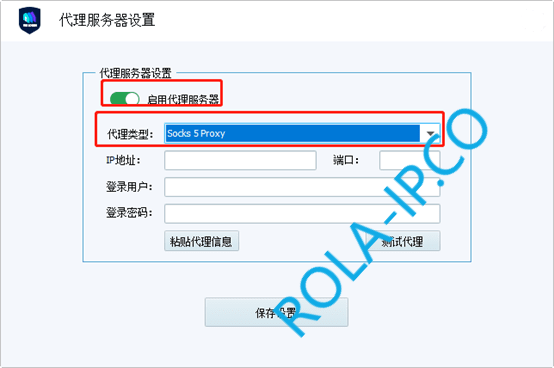
Open proxy server settings, Enable Proxy Server, Proxy Type select HTTP proxy or SOCKS5 proxy, take SOCKS5 proxy as an example
Step 3: Fill in Proxy Information
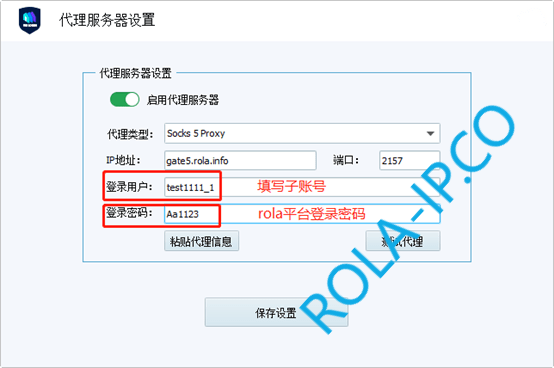
Fill in IP Address, Port, Login User, Login Password, take Rotating Residential IP as an example:
📍 How to Get Proxy Information
- Rotating IP: In the backend, select
Global Residential IP→Rotating Residential IP→ ClickGenerate Proxy Informationto see - Static IP: In the backend, select
Global Static IP Traffic Billing→Static Residential IP Order Listto see
Step 4: Check Proxy
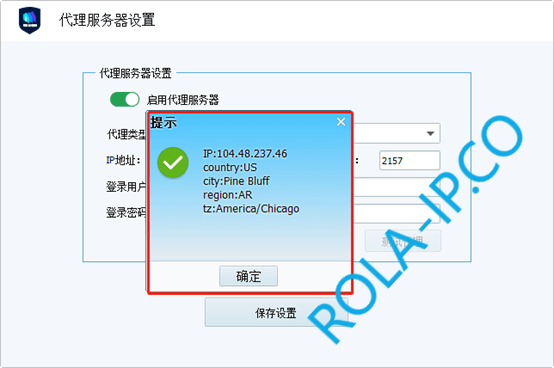
After filling in, click Check Proxy, the detected IP is consistent with the IP detected in the backend, that is, the configuration is successful, click OK to complete
✅ Configuration Complete
Now you can use VMLogin to access websites normally!